Reporting and analytics using natural language
Chat with your database. Save insights as refreshable reports.
Explore your data by chatting
Your database knows more than you think. Reportr gives you an AI chat interface to ask questions, uncover trends, and visualize results.
Conversational data exploration
Reportr's chat works the way you think — as a conversation, not a one-off query.
Ask a question, then follow up. Drill down, compare segments, spot trends, and refine your analysis. AI carries the full context of your conversation forward, so every follow-up builds on what came before — no re-explaining, no starting from scratch.
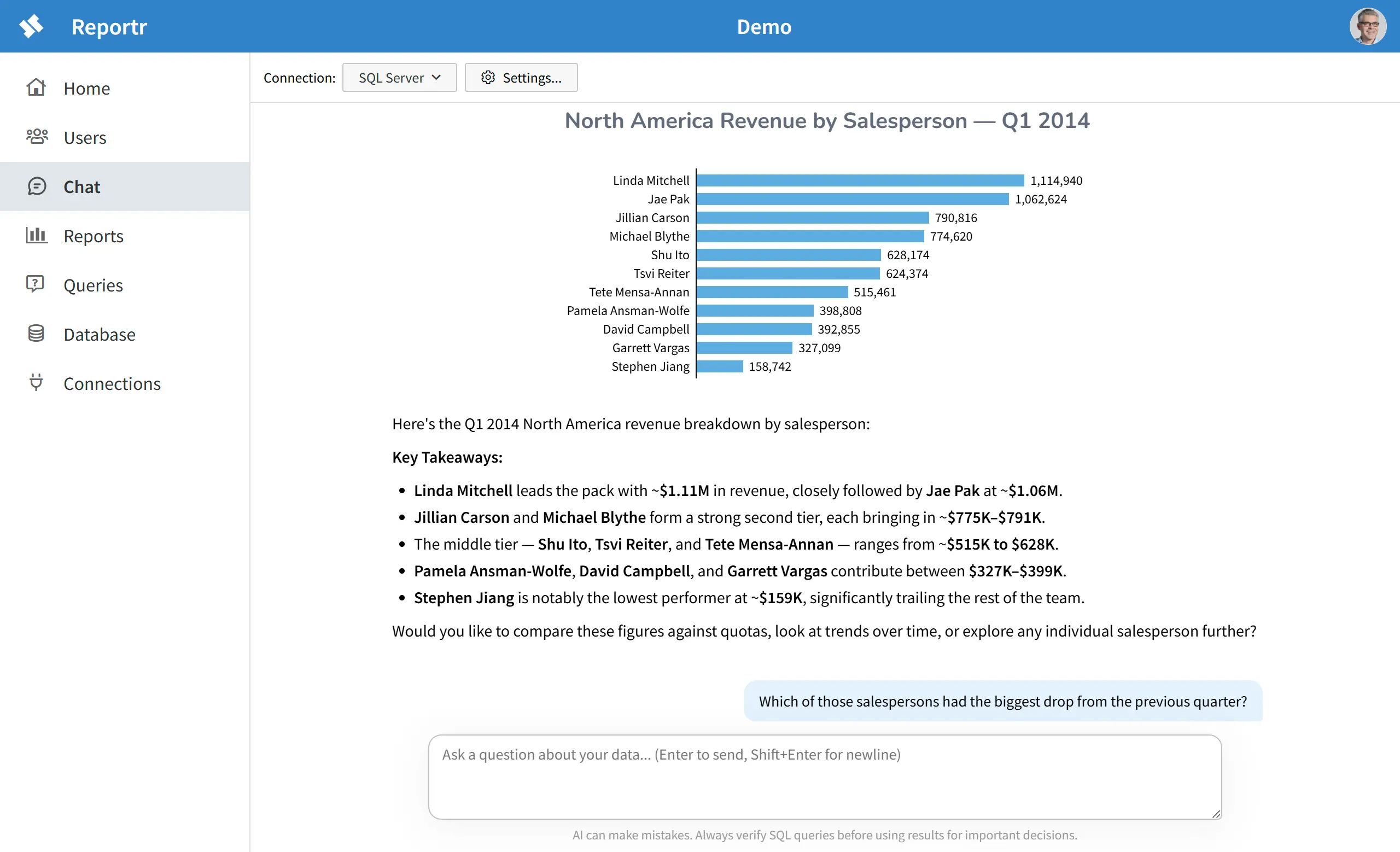
Example flow: "Show me revenue by region for Q1." "Now break down North America by salesperson." "Which of those salespersons had the biggest drop from last quarter?"
Insights you didn't know to ask for
Reportr doesn't just answer your questions — it surfaces what your data is telling you.
Because AI combines what's in your database with its broader knowledge of the world, it can surface patterns, anomalies, and context that you might never have thought to query. Industry benchmarks. Seasonal expectations. Correlations that only make sense if you already knew to look for them.
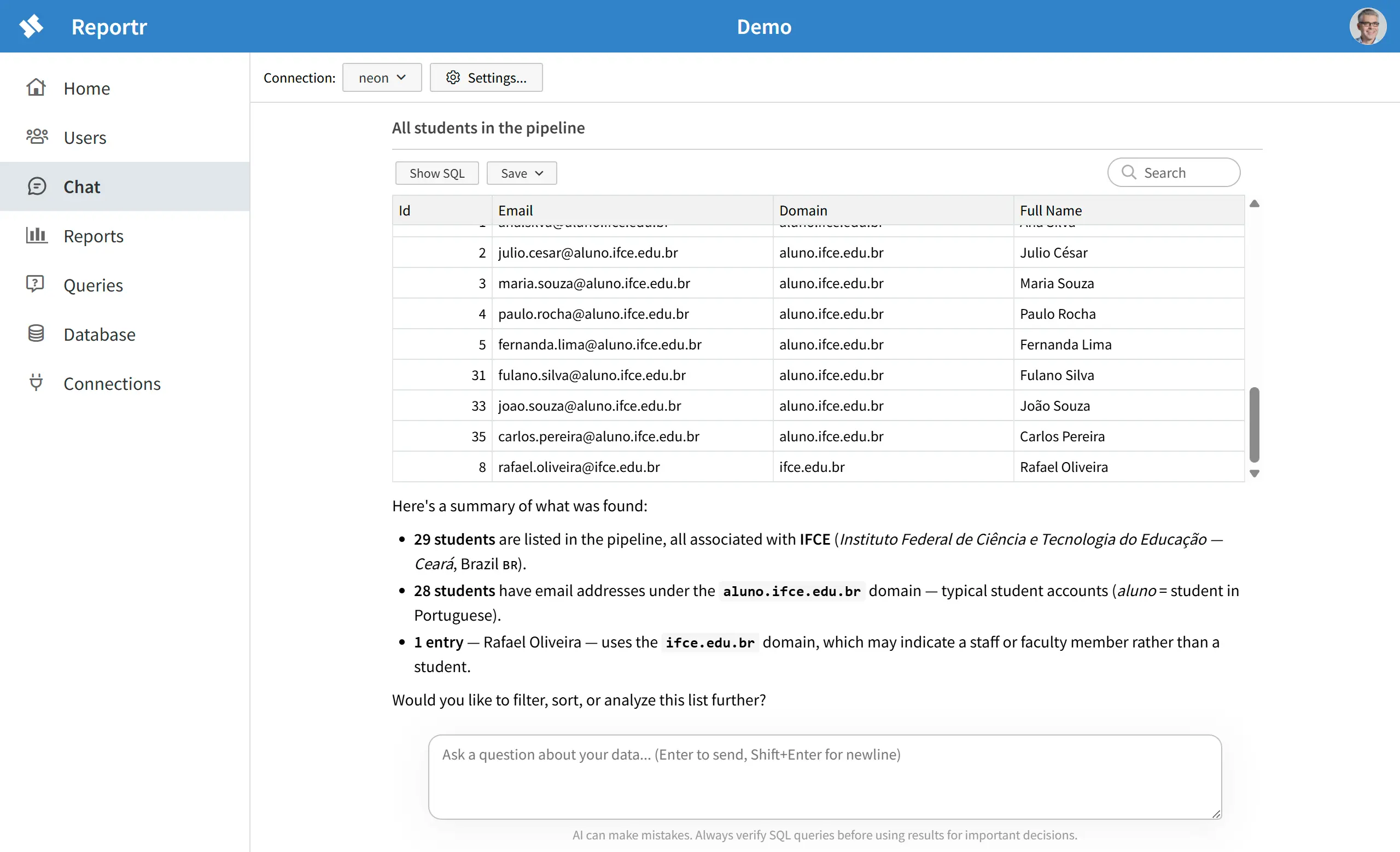
Example: "Show me all students in the pipeline." Reportr returns the list — and then explains what it found: that aluno is Portuguese for "student," that the domain points to IFCE — a federal technical institute in Ceará, Brazil — and that one entry appears to use a staff domain rather than a student domain.
Agentic analysis
Reportr doesn't just translate your question into a single query — it investigates.
Ask a high-level question, and Reportr runs a query, examines what comes back, and decides what to check next — slicing and dicing the data every which way until it has an answer. This is agentic analysis: a chain of exploratory queries, each one informed by the last, the same way a human analyst would dig into a dataset.
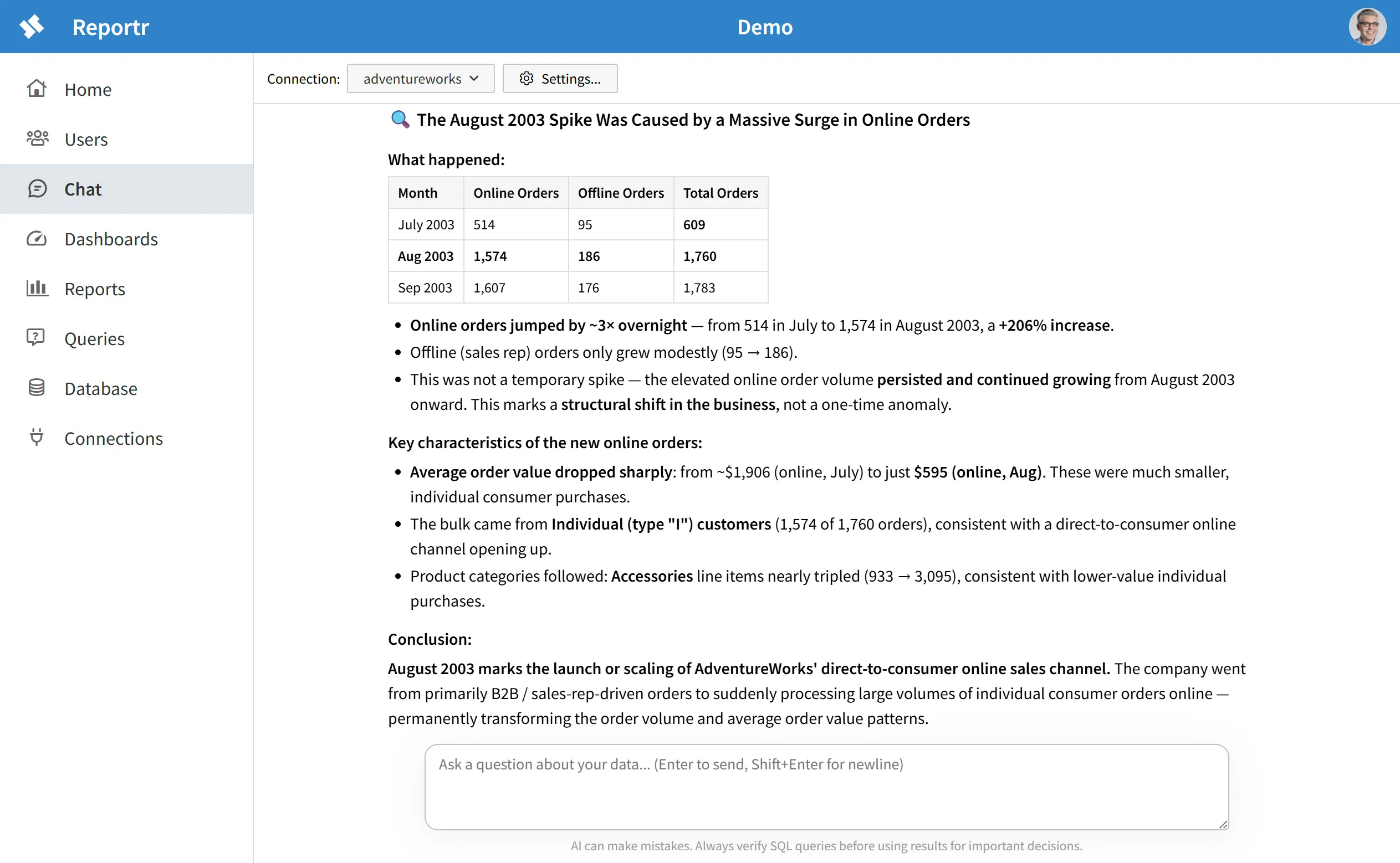
Example: "I see a spike in Aug 2003. What caused that?" Reportr starts broad — pulls monthly order totals, spots the jump. Splits it by online vs. offline to isolate where the growth came from. Checks average order value, sees it drop. Cross-references customer type, then product category, until the picture is clear. Four queries, each shaped by the last — then, and only then, an answer.
Save insights as reports
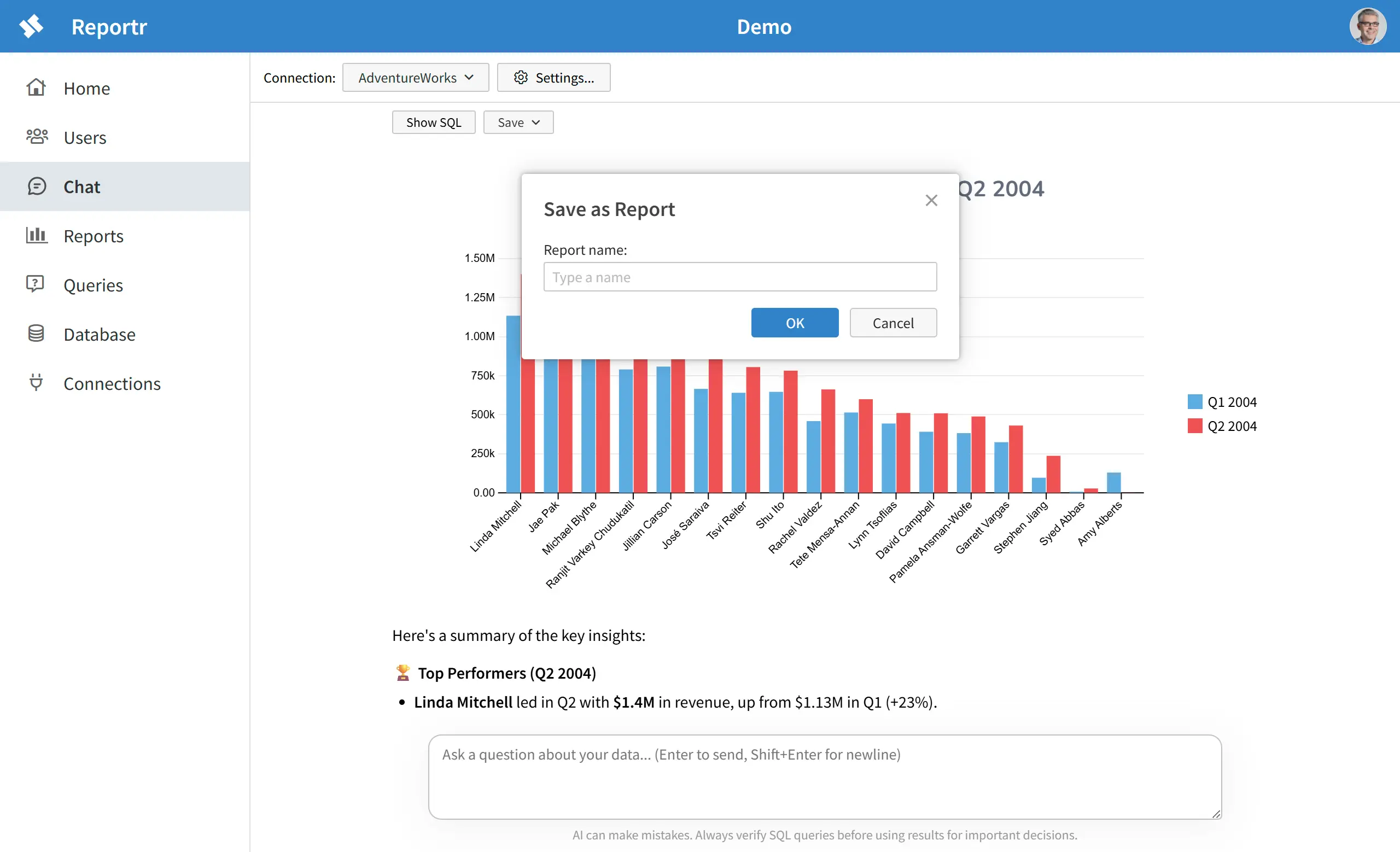
Chat is ephemeral. Every conversation starts fresh, and that's fine for exploration — but not for information you need every week.
When a chart or table tells you something you'll want to see again, save it as a report. That result becomes a live, refreshable view — pulling fresh data from your database every time you open it, no conversation required.
Assemble reports into dashboards
If you can ask a question in chat, you can build a dashboard.
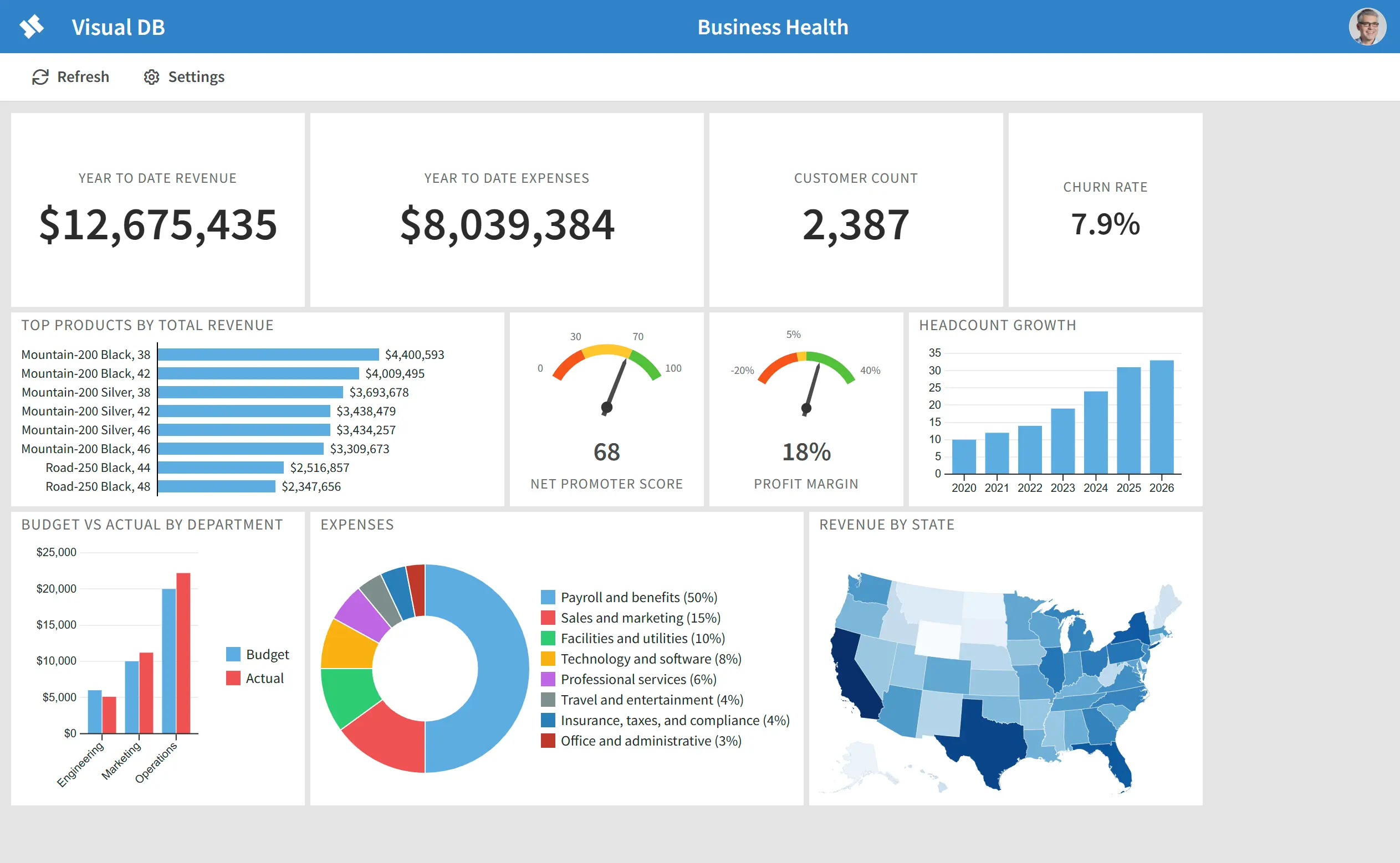
Every chart Reportr generates in chat can be added to a dashboard. Keep asking questions, keep saving interesting visualizations, and in a few minutes you have a monitoring view that would normally take days in a traditional BI tool.
Once added, dashboard tiles stay live — reflecting the current state of your database, not a snapshot from the day you built it.
Full end user reporting
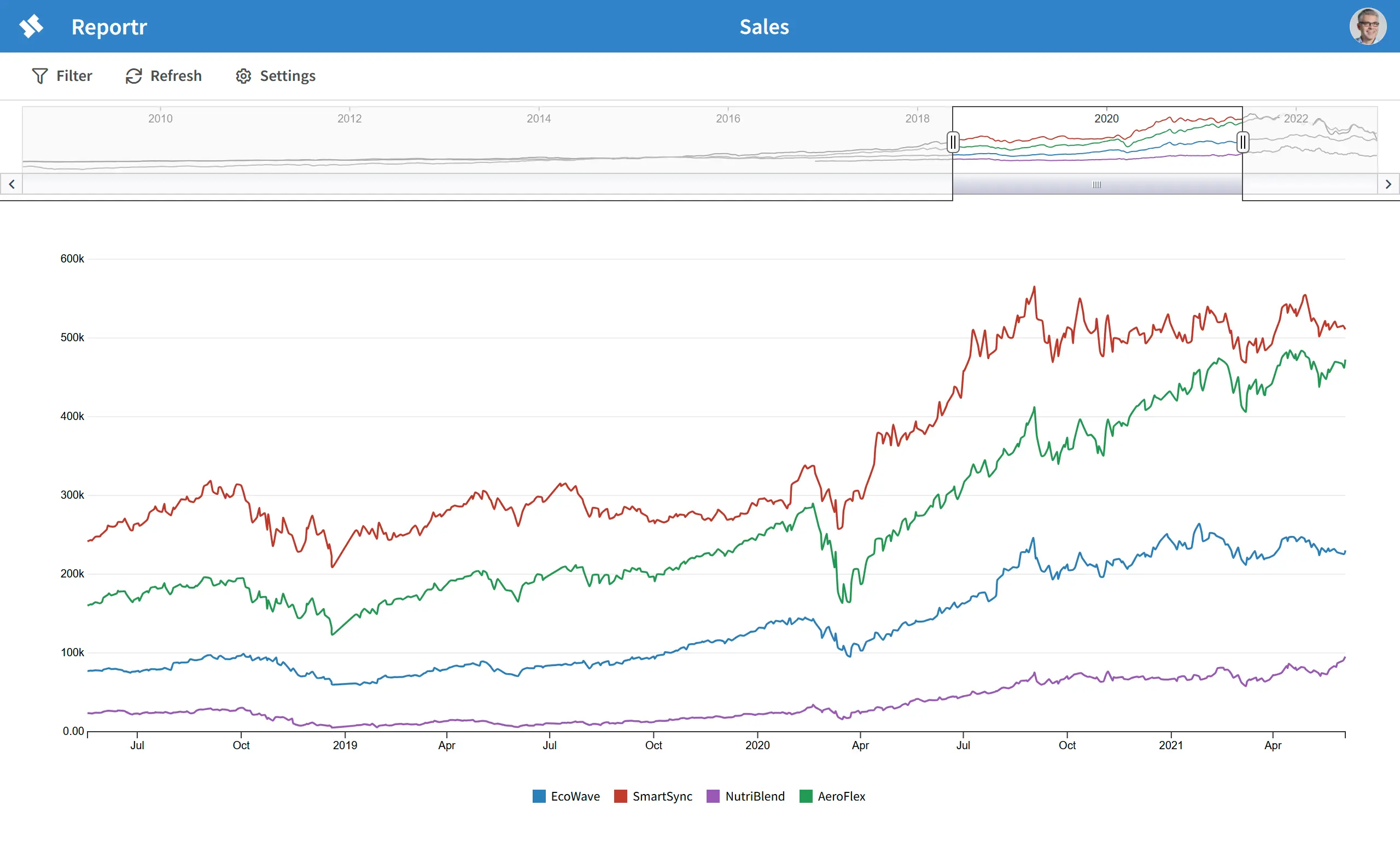
AI chat is Reportr's headline feature, but behind it is a full reporting platform: a visual report builder, tables, charts, parameterized queries, role-based access, and refreshable reports. Everything a business needs to make data accessible to everyone on the team.
This platform stands on its own — build and manage reports and dashboards entirely through the visual builder, no chat or AI required. Use AI when it helps you move faster, or skip it entirely and build reports by hand.
Rich tabular reporting
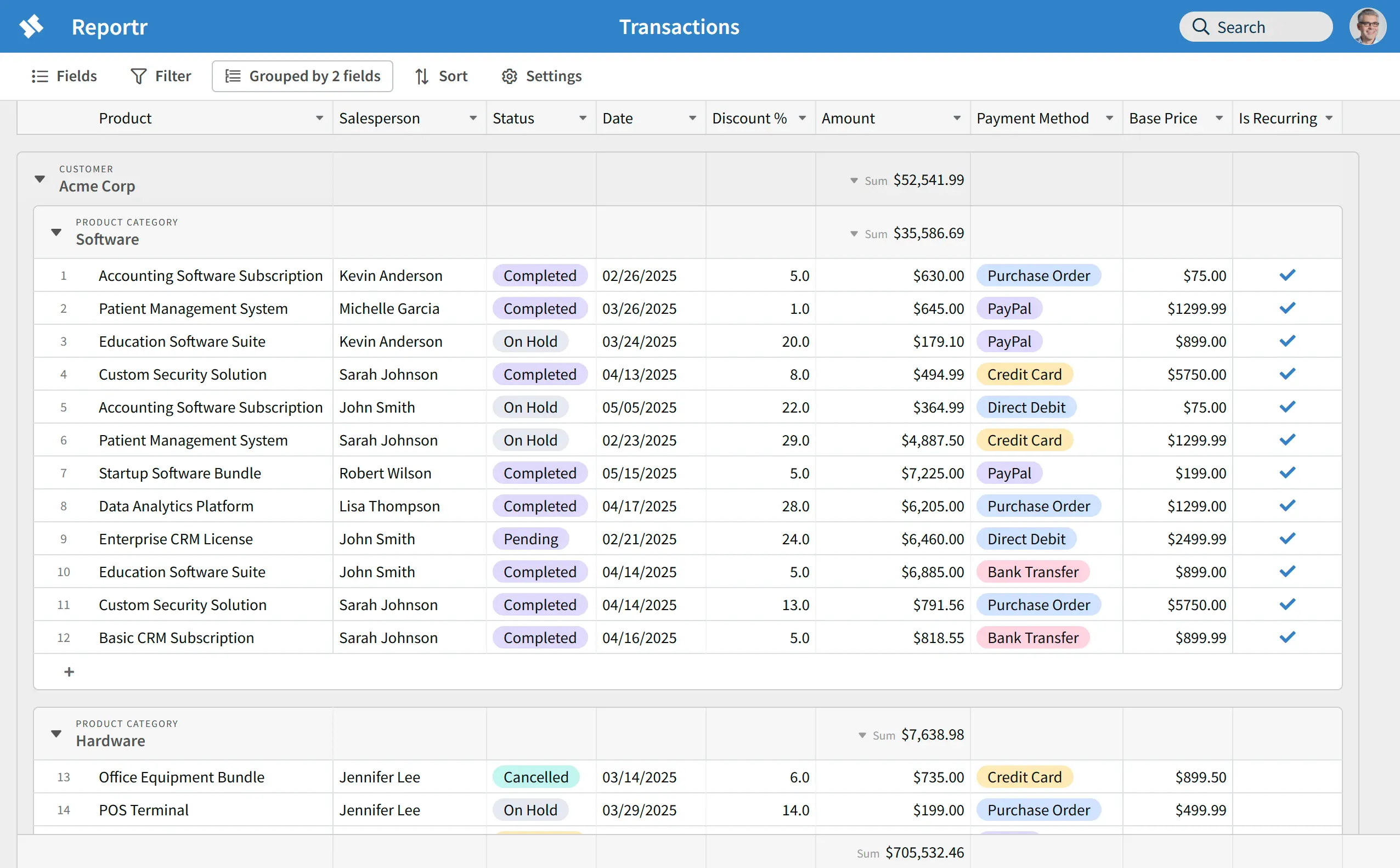
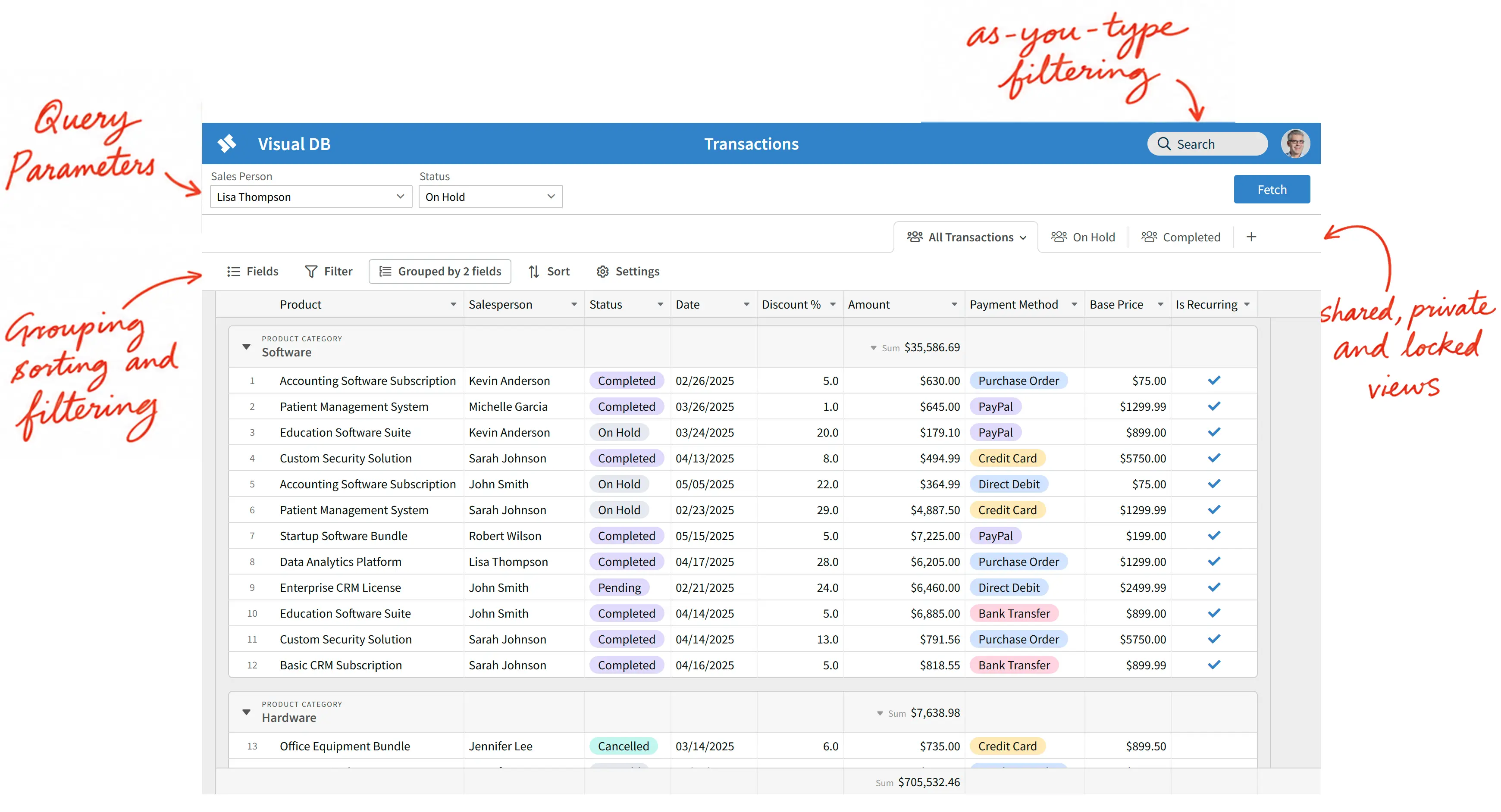
Tables are the backbone of business reporting. Revenue by region. Orders by customer. Inventory by SKU. Most business questions have a tabular answer — and the ability to sort, filter, and search that data on the fly is what turns a static report into a working tool.
Reportr's table reports support interactive grouping, sorting, and filtering at view time. Resize and reorder columns to suit your layout. And as you type in the search box, matching rows appear instantly — with totals that update to match the filtered rows.
Centralized management
Reportr is a web application — there's nothing to install, nothing to update, and no desktop app to manage across your team.
Reportr keeps your connection details on the server. Users query your data through Reportr without ever seeing a connection string or credentials. You stay in control.
Role-based access control
Not everyone on your team needs the same level of access. Reportr's role-based access control lets you give each user exactly the permissions they need — from view-only access to report building, database management, and full administrative control.
Access is managed at the Application level, so you can tailor permissions separately for each workspace.
Keep your data secure
Reportr can be self-hosted, so your data never passes through our servers — it flows directly between your database, your users, and the AI service.
For AI service, Reportr supports models hosted on AWS Bedrock — which never stores or uses your data to train models, and is HIPAA eligible.
Semantic layer — a roadmap for your database
Every database accumulates years of ad-hoc changes, exceptions, and obsolete structures — a gradual degradation informally known as "schema rot." The signs are familiar: columns that are no longer used, cryptic names like status2, misc, or flag, columns whose meaning has quietly shifted over time, tables that linger long after their purpose is gone. This is not a sign of poor engineering — it's an inevitable result of a database that has evolved alongside a real business. Schema rot is why other AI data tools struggle to produce accurate answers against real-world databases — they rely on raw schema, table and column names to understand your data, and schema rot makes those an unreliable guide.
Reportr's semantic layer solves this. It gives AI a roadmap to your database — defining what your schema actually means rather than leaving AI to guess from cryptic column names and missing relationships. Give tables and columns business-friendly names and descriptions, document relationships between tables, capture business rules, and flag tables and columns that should be ignored. AI uses this context to generate queries against what your data means, not just what it's called.
Sometimes you just want to see the data
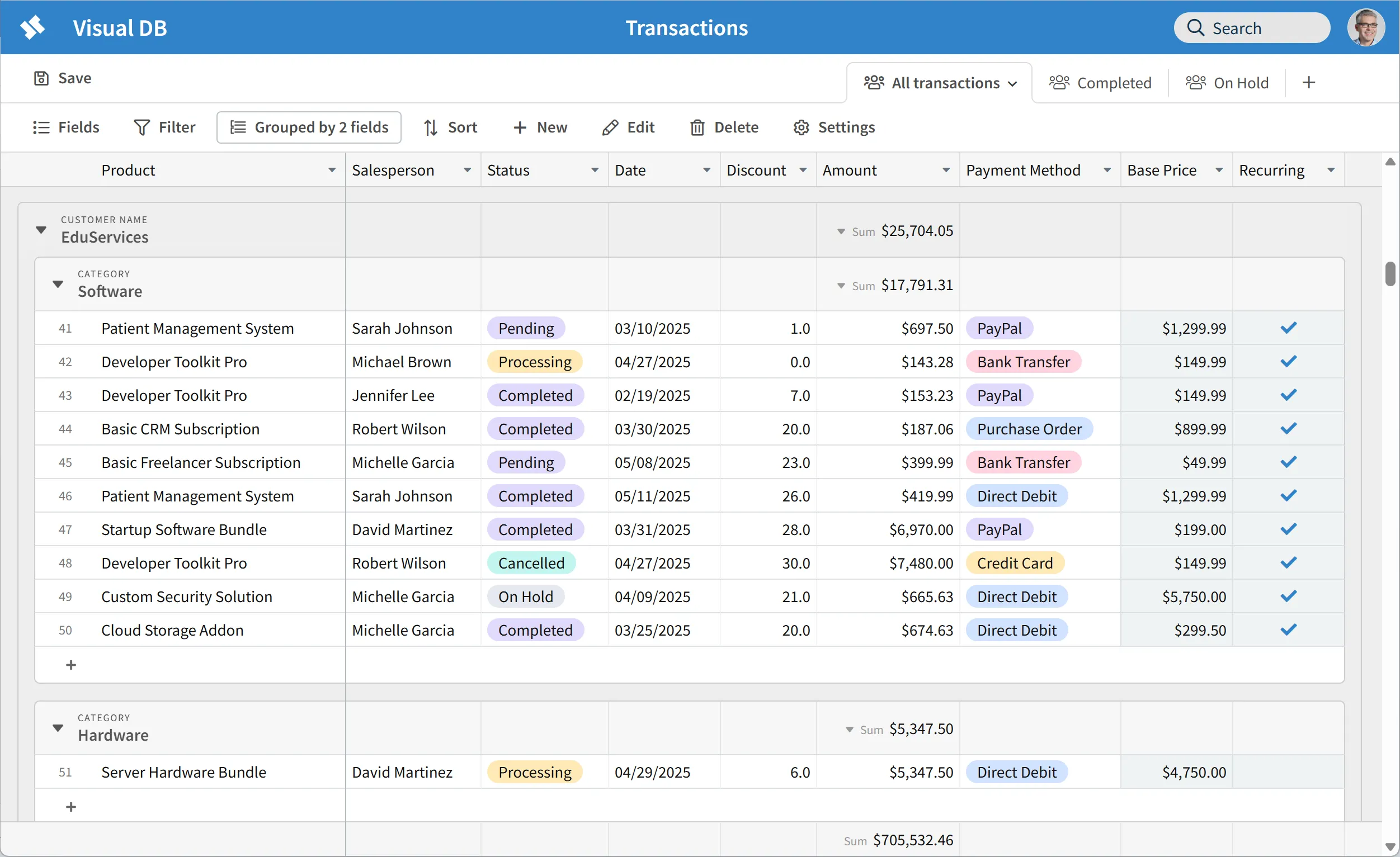
AI is great at answering specific questions — but sometimes you don't have a specific question. You want to scroll through this month's transactions, spot something that looks off, group by salesperson to get a feel for the numbers, or filter down to a particular customer. That kind of open-ended exploration doesn't fit neatly into a question you can type into a chat box. Reportr's interactive table reports let you do exactly this — group, sort, filter, and search across tens of thousands of records, with query parameters that let you narrow the data before it even loads. It's the difference between asking a question and looking at the data yourself.
Works with your existing database







Frequently Asked Questions
Simple, transparent pricing
Start free and scale as you grow. No hidden fees, no surprises.
Free
Perfect for getting started
- Unlimited reports
- AI chat plus end-user reporting
- All supported database types
- Limit of 4 users
Business
per user/month
5 users minimum
- Everything in Free
- No limit to number of users
- All supported database types
- Priority support
14-day free trial
Bring your own OpenAI or Claude key. More models coming soon.
Self-hosting? $20/month per user, capped at $200/month per server regardless of team size.
Ready to dive in?
Join thousands of teams already boosting their productivity with Reportr